Showing posts with label interactive. Show all posts

Friday, 13 February 2015

An Interactive Video tool- Vialogue

Here comes another exciting tool - Vialogue! From its name, it is not difficult to guess that it has something to do with "video" and "dialogue". In fact, as a great platform for launching discussions around a specific video, this tool is brilliant for ELT teachers to design listening exercises.

From my own experience as a language learner, authentic materials are always more appealing to learners than the 'designed' materials in the textbook as a learning resource. They are more interesting and useful. For example, online videos, which include news reports, movie clips, celebrities' speeches, documentaries, advertisements and so on, tend to be up-to-date, close to life and  more likely to help learners to adapt to the normal speed of native speakers'. However, one problem related to using these videos as listening exercises is: when learners are not clear about the important information (which can happen often for learners with relatively weak listening skills), they need to rewind to those points and this action can sometimes be quite troublesome and time-consuming. BUT now with the help of Vialogue, this can be easily achieved and saves time for not only students but the teacher. To design a listening exercise using a video, the teacher can first create a Vialogue like picture A: (tutorial of Vialogue can be found on https://www.youtube.com/watch?v=aX8oFxFGGAg )
Pic. A


and then add some questions based on the video content. The question can be a fill in the blanks one (like picture B), a multiple choice one (the template is provided, see picture C), an open ended one, etc. Better still, whenever a question is created, it will be automatically matched to the relevant point of time (alternatively, teachers can put it a bit earlier to increase the difficulty) so that students don't need to do the 'rewind' action manually to catch these points which can be important information of the whole video.

Pic. B

Pic. C

Pic. D

Apart from turning the video into a 'formal' listening exercise, the teacher or any student can put comments on it any time (instead of after finishing the whole watching) and this is time stamped, which allows other people to relate to the original content. Sometimes watching a 'long' video can be boring and is likely to demotivate students at some point. Adding comments or replying to the comments makes the watching process interactive. The comment can be anything related to the video, for example, questions, background knowledge, personal feelings, language points, etc.

Having said all of these, I just can't wait to begin my journey with this super smart tool. If you are also a big fan of using videos in your teaching - have a go with Vialogue!

Bibliography
Vialogues-Make Videotaped Lectures Interactive
http://languageteku.over-blog.com/vialogues-make-videotaped-lecturers-interactive

Sunday, 8 February 2015

Some Thoughts on Interactive Whiteboards


As a high-end technological instructional tool, the interactive whiteboard (IWB) can now be found in most of the UK schools. Having experienced it in the ICT in ELT classes this year, I want to write down some of my feelings about this "seemingly" powerful tool which has not yet been popularized in my home country.

Admittedly, IWBs did capture my attention immediately when I first saw the teacher use it to flip through her PowerPoint slides just like performing magic. "It is amazing, absolutely splendid!"- I felt in my heart. Like a huge iPad, it allows users to touch, click or drag the items on the screen with their fingers or an IWB pen. Better still, notes can be handwritten on the board, which can then be transformed into a PDF file or text and be saved and sent to the students. However, there were some moments when handwriting could not be recognized by this advanced board and the teacher had to give up and returned to use the mouse and the keyboard. I remembered once the teacher asked each of us to come up and choose an option for a question; unfortunately, the IWB could not recognize our touch and it turned out to be the teacher clicking on it for us using the mouse!  In terms of the interaction from this aspect, the main interaction I can see is that between the teacher and the whiteboard. I can hardly find any interaction between students.

In terms of the classroom activities or games with this smart board, most of them (I have experienced in the class) share the following features: students come up to the board to click a relevant icon or drag something like a word or a picture to a certain place (where the answer may be) as part of the group work; or each group has a representative to do a similar action for the whole group. When one of the class members go up to the board to finish his part, other members just sit in their seats watching that person doing his bit and then another person finishing another bit. Although I was amazed at how these normal activities can be done in such a gorgeous way by means of the technology, gradually I got a bit bored of it, beginning to consider "what's the point of doing this""is it a waste of time seeing other people 'interacting' with the whiteboard while the rest of us just sitting quietly""has the students' language ability been improved by doing this" and so on. Perhaps for young learners, it will be more beneficial as it can cultivate their hands-on ability as well as for kinaesthetic learners who like to move and touch a lot while learning.

There is no doubt that IWBs can be used in other better ways which may achieve "real" interactions. But that requires the teacher to have a high skill of using it and they may need to spend much more time in the preparation stage compared to using a normal whiteboard (yet the added interactive effects with an IWB are unknown). Having said that, there are still many useful points of an IWB, such as in the way the teacher uses the PowerPoint which can achieve some flash effects as well as in accessing materials more easily, even though they seem to have little to do with interactivity.

As far as in the learning context of my home country (China), from my own experience, quite many Chinese students prefer sitting still listening to the teacher's talk to moving a lot. Also, given the high price of an IWB, it may be difficult for it to become a popular tool in the next few years in the ELT classroom in China, even in its developed areas.

Sunday, 18 January 2015

Let 'Triptico' Enliven Your Class

Triptico is a highly recommended teaching tool for promoting classroom interaction, especially for teachers with IWBs. It is very simple to install and use- just spend a few minutes downloading and installing the Triptico Plus desktop app, and then you can embark on the journey immediately (without registering)! More excitingly, a number of the apps it provides are completely FREE.

There are loads of handy and creative apps in Triptico that can catch the students attention right away and are conducive for teachers to build an interactive and collaborative learning environment. Compared to traditional teacher-centred approach, collaborative learning is more likely to promote students' interest in learning and to enhance their ability to think critically (Dooly, 2008).


Here, three apps that I particularly like will be introduced briefly. All of the apps in Triptico have beautiful sound effects! The first one is Student Group, which allows teachers to group students randomly. Simply by loading a list of students' names and selecting a number of groups that you want to create, you will get a result like the following picture.


To present the result in a clearer way, you can click the second button  from the bottom left. Then a clear classification will be shown to you like the following picture. By further clicking the button , a leader for every team will be randomly picked out. Isn't it very cool? With this app, teacher's headache of sorting students into groups can be easily solved, which avoids the situations that students form groups comprised of their own friends and that students feel forced and unhappy if they are grouped by their teacher. Besides, grouping in this way can add a bit surprise to the "dull" classroom atmosphere. For teachers without IWBs, this app is still useful.
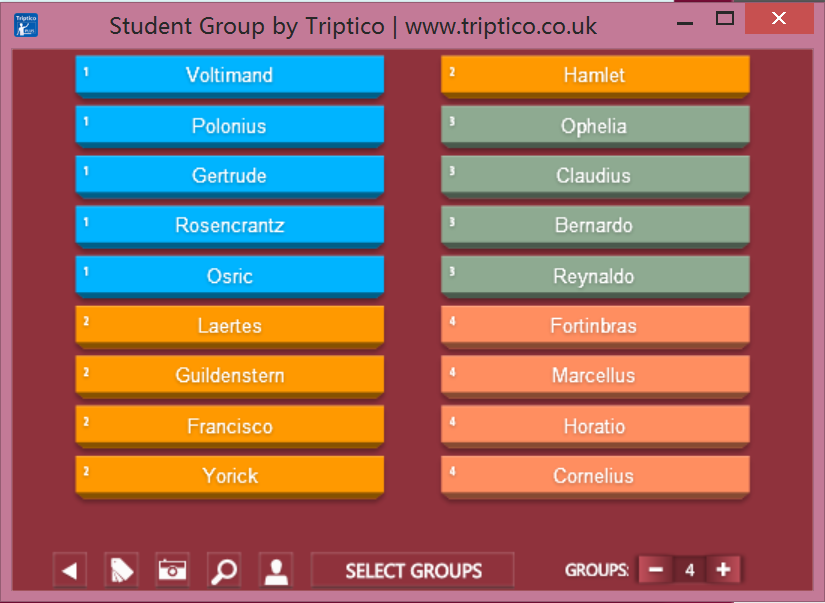
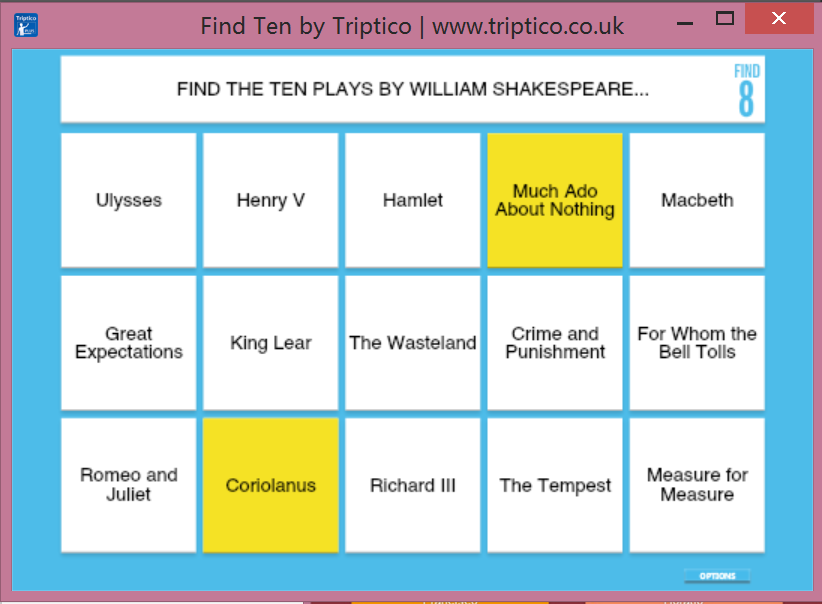

The second tool is called Find Ten. In this activity, the teacher provides students with 15 answers to a question. Ten of them are correct while five are wrong. Students need to choose carefully or they will lose points if the answer is wrong. This exercise can enhance students problem solving and critical thinking ability. With the use of an IWB and the fantastic sound effects this app provides, the activity will be undoubtedly engage students' participation. Moreover, the sleek template makes it simple to use and takes little time.

The third app is Word Magnets, which definitely encourages students to work collaboratively. This is a wonderful tool for teaching grammar, vocabulary and writing. Each word or symbol is a magnet. It requires students to put the magnets that are in a random order into certain sequences. Exercises such as completing sentences can be designed with this app. Students can complete a sentence in a pair or a group and then all the pairs or groups can be asked to put the finished sentences into a logical paragraph.


There are a lot more to be explored in Triptico. What is more appealing is that new apps will be constantly developed. You can also purchase the Triptico Plus which provides more stunning apps. As for the target group of students, personally I think this tool can suit quite a large range of students, no matter young learners or adults. It largely depends on the way the teacher uses it as well as what kind of material the teacher embeds in it. However, for classes without IWBs these apps may not be that attractive. Also, it is not suggested to use them often because students may get bored with them, which may decrease the novelty of these apps. Nevertheless, using them at an appropriate frequency can achieve desirable effects.


Reference

Dooly, M. (2008). 'Constructing Knowledge Together', in Telecollaborative Language Learning: A guidebook to moderating intercultural collaboration online. Bern: Peter Lang.